How to Use Your Phone on a
Cruise Without Getting Hit With Roaming Charges
Your phone is probably one of the last things you'd consider leaving at home for a cruise.
It's your camera, alarm clock, cruise line app, map, boarding pass, communication device, and entertainment center all rolled into one.
But using your phone on a cruise is a little different from using it during a regular vacation. Once your ship sails away from land, your phone may be able to connect to a maritime cellular network—and that's where unexpected charges can happen.
The good news? You don't have to turn your phone off and throw it in the cabin safe for a week.
You just need to know what your phone is connecting to.
Here's how to stay connected on your cruise without coming home to an ugly surprise on your phone bill.
The Most Important Rule: Use Airplane Mode at Sea
If you remember only one thing from this article, make it this:
When you're at sea, put your phone in airplane mode.
Your phone doesn't necessarily stop searching for cellular service just because you've sailed away from land. Some cruise ships have access to maritime cellular networks that allow phones to connect while offshore.
If your cellular connection remains active, your phone could connect to one of these networks.
And you don't have to be actively scrolling through Facebook or watching videos to use data.
Your phone may be doing things in the background, including:
Checking email
Refreshing apps
Uploading photos
Syncing cloud storage
Receiving notifications
Updating social media
Downloading app or system data
Airplane mode prevents your phone from casually wandering onto a cellular network while you're enjoying your cruise.
Can You Use Wi-Fi With Airplane Mode Turned On?
Yes.
This is one of the most useful things to know before your cruise.
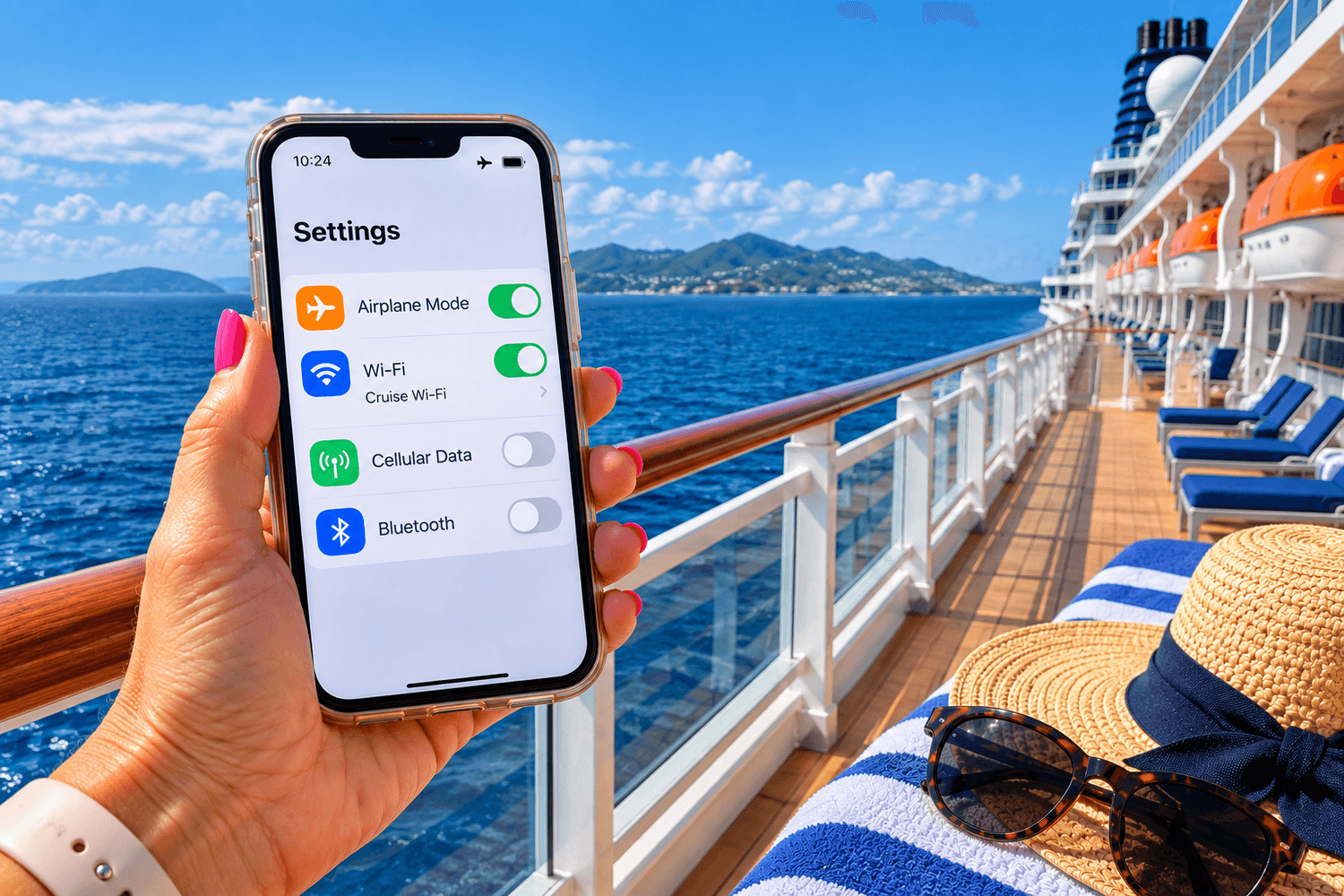
When you initially turn on airplane mode, your phone typically disables its wireless connections. You can then manually turn Wi-Fi back on while leaving airplane mode enabled.
So your settings can look like this:
Airplane Mode: ON
Wi-Fi: ON
Cellular Data: OFF
You can then connect to the cruise ship's Wi-Fi network without leaving your normal cellular connection running.
That gives you internet access through the ship's Wi-Fi while helping prevent accidental cellular use at sea.
Cruise Ship Wi-Fi and Cellular Service at Sea Are Different
It's easy to confuse these because both can keep your phone connected while you're cruising.
But they're not the same thing.
Cruise ship Wi-Fi connects your phone to the ship's internet service.
Maritime cellular service allows your phone to connect to a cellular network while the ship is offshore.
Buying a cruise ship Wi-Fi package does not mean you need to leave cellular data turned on.
If you're using the ship's Wi-Fi, you can keep airplane mode on and manually enable Wi-Fi.
That's the combination I prefer because it's simple and removes a lot of the guesswork.
Why Can Cellular Service at Sea Be So Expensive?
Your regular unlimited phone plan doesn't necessarily mean unlimited cellular service while you're sailing across the ocean.
Cellular service aboard a cruise ship may be treated differently from normal domestic or international cellular service.
What you'll pay depends on several things, including:
Your cellular carrier
Your specific phone plan
The ship you're sailing on
Whether your carrier offers a cruise or maritime plan
Whether you're using calls, texts, or data
Before your cruise, check directly with your carrier to find out how your particular plan handles cellular service at sea.
Don't assume that an international plan covering Mexico, the Caribbean, or Europe also covers you while the ship is sailing between those destinations.
Being in Mexico and sailing toward Mexico are two very different things as far as your phone is concerned.
What Happens When Your Ship Arrives in Port?
Once you're in port, the situation changes.
Instead of relying on cellular service available offshore, your phone can connect to land-based cellular networks at your destination.
Depending on your phone and plan, you may be able to use:
Your carrier's international roaming plan
A travel eSIM
A local SIM card
Wi-Fi at the cruise terminal
Wi-Fi at restaurants, cafés, hotels, or other businesses
Which option makes the most sense depends on where you're cruising and how much you plan to use your phone ashore.
If all you want to do is send a quick message while having lunch, occasional Wi-Fi may be enough.
But if you're exploring independently and want maps, directions, transportation apps, excursion information, restaurant searches, and messaging throughout the day, having your own data connection can be extremely convenient.
An eSIM Can Be a Great Option for Cruise Port Days
An eSIM is a digital SIM that lets a compatible unlocked phone connect to supported cellular networks without physically changing your regular SIM card.
For cruisers, the big advantage is port-day connectivity.
Depending on your itinerary, you may be able to purchase coverage for an individual country or a regional plan covering several destinations.
That can give you mobile data for things like:
Maps and directions
Transportation apps
Excursion information
Restaurant searches
Messaging
Email
Translation apps
Checking opening hours
Looking up information while you're exploring
One option for international travelers is Nomad eSIM.
Need Data During Your Cruise Port Days?
Check available Nomad eSIM plans for the destinations on your cruise itinerary before you leave home.
An eSIM Does NOT Replace Cruise Ship Wi-Fi at Sea
This is important.
A travel eSIM is useful when your phone can connect to supported land-based cellular networks.
It isn't a substitute for the ship's Wi-Fi when you're out in the middle of the ocean.
The easiest way to think about it is:
At sea: Airplane mode + cruise ship Wi-Fi if you want internet access.
In port: Your carrier's international coverage or a travel eSIM.
Those are two different situations requiring two different types of connectivity.
Set Up Your eSIM Before You Leave Home
If you're planning to use an eSIM, don't wait until you're standing on a pier in another country to figure it out.
Set everything up while you're still home with reliable internet access.
Before purchasing an eSIM, make sure:
Your phone supports eSIMs
Your phone is unlocked
The plan covers the destinations you're visiting
You understand when that particular plan activates
You can also familiarize yourself with your phone's SIM and cellular settings before the trip.
That's much easier than trying to learn where everything is while you're wandering around a cruise port.
Be Careful If Your Phone Uses Two SIMs
Many newer phones can keep your regular cellular line and a travel eSIM available at the same time.
That's convenient, but it also means you need to know which line your phone is using for mobile data.
When you're using an eSIM in port, make sure the eSIM you've purchased is selected for cellular data.
Otherwise, you could buy a travel data plan and accidentally continue using your regular carrier's roaming service.
The exact settings vary by phone, so check yours before you travel.
What About Phone Calls and Text Messages?
This can get a little more complicated because every carrier and phone plan is different.
Many travel eSIM plans are primarily designed to provide mobile data rather than replace your regular phone number and cellular calling plan.
With an internet connection, however, you may still be able to communicate using internet-based messaging and calling services.
Before leaving home, check how your own carrier handles:
Incoming calls
Outgoing calls
SMS text messages
MMS messages
Wi-Fi calling
Voicemail
International roaming
Cellular service aboard cruise ships
If staying reachable by your regular phone number is important, figure this out before embarkation day.
Download Your Cruise Line App Before Your Cruise
Don't wait until you're standing in the cruise terminal to download your cruise line's app.
Do it at home.
Cruise line apps may provide access to things like:
Daily activities
Dining information
Reservations
Entertainment schedules
Deck maps
Excursion information
Your onboard account
Messaging
Ship information
Features vary by cruise line and ship, and some functions may work differently depending on whether you've purchased an internet package.
Download the app, sign in, and make sure you remember your password before you leave home.
Embarkation day is hectic enough without fighting with a forgotten password.
Don't Depend Entirely on Free Wi-Fi in Port
Free Wi-Fi is available in plenty of cruise destinations.
You may find it at terminals, restaurants, cafés, hotels, shops, or tourist attractions.
It's handy when you can get it, but I wouldn't necessarily make it my entire port-day connectivity plan.
You may need to find the network, get a password, accept terms, or stay near a particular business.
Public Wi-Fi can also have security concerns, especially if you're accessing sensitive accounts or information.
If you're exploring on your own, having your own mobile data connection is usually much more convenient.
Watch Out for Background Data
One of the biggest misconceptions about roaming is:
“I'll leave cellular on, but I just won't use my phone.”
The problem is that your phone may use data even when you're not actively using it.
Apps refresh. Photos sync. Email downloads. Notifications arrive.
That's why airplane mode is such a useful cruise habit.
Instead of trying to remember which individual settings and apps you've disabled, you simply prevent the cellular connection while you're at sea.
A Simple Phone Routine for Every Cruise Day
You don't need a complicated checklist.
Before Sailaway
Turn on airplane mode.
If you're using the ship's internet, manually turn Wi-Fi back on and connect to the ship's official Wi-Fi network.
While You're at Sea
Leave airplane mode on.
Use the ship's Wi-Fi if you've purchased internet access or need it for available onboard services.
When You Arrive in Port
Once you're ready to use land-based cellular service, connect using the international option you've chosen.
That might be your regular carrier's international coverage or your travel eSIM.
Before the Ship Leaves Port
Put your phone back into airplane mode.
Make it part of your routine:
Check ship time. Get back aboard. Airplane mode on. Go find dinner.
Easy.
Do You Need to Buy Cruise Ship Wi-Fi?
Not necessarily.
It depends entirely on how connected you want to be while you're sailing.
If you're happy disconnecting at sea and using cellular data only during port days, you may decide you don't need a ship internet package.
On the other hand, cruise Wi-Fi can be useful if you want to:
Check email
Browse the internet
Use social media
Communicate with people at home
Stream entertainment
Work while traveling
Internet packages, speeds, devices allowed, and pricing vary between cruise lines and ships.
Check the current options available for your particular sailing before deciding.
Why Not Just Turn Off Data Roaming?
You can.
Turning off data roaming is another useful safeguard.
But when I'm cruising, I prefer the much simpler rule:
At sea = airplane mode.
There are too many combinations of carriers, plans, phones, cruise packages, international coverage, Wi-Fi calling, dual SIMs, and roaming settings to pretend there's one perfect cellular configuration for everyone.
Airplane mode gives you one simple habit to remember.
Then turn Wi-Fi back on if you want to use the ship's internet.
Before Your Cruise: Do a Five-Minute Phone Check
A few minutes of preparation before you leave home can save you a lot of aggravation later.
Make sure you know:
How to turn airplane mode on and off
How to turn Wi-Fi back on while airplane mode remains enabled
What your carrier charges for international and maritime use
Whether your phone is unlocked
Whether your phone supports eSIMs
Which destinations your international plan or eSIM covers
How to select the correct SIM for mobile data
Whether you want to purchase cruise ship Wi-Fi
You don't need to become a cellular-network expert.
You just want to know enough that your phone doesn't make expensive decisions for you.
The Bottom Line
Using your phone on a cruise doesn't have to be complicated.
The biggest thing to remember is that cellular service at sea is different from cellular service in port.
When you're sailing, keep your phone in airplane mode and turn Wi-Fi back on if you want to connect to the ship's internet.
When you're in port, you can use your carrier's international coverage or a travel eSIM for land-based cellular data.
And if you're planning to use an eSIM, set it up before your trip rather than trying to figure it out after you've arrived.
A few minutes spent checking your settings before your cruise can help you stay connected when you want to be—without getting home and wondering what the heck happened to your phone bill.
Stay Connected During Your Cruise Port Days
See which Nomad eSIM plans are available for the countries on your itinerary.
Related Articles
Affiliate Disclosure: This article may contain affiliate links. If you make a purchase, book a cruise, or book a travel-related service through these links, I may earn a commission at no additional cost to you. As an Amazon Associate, I earn from qualifying purchases. Thank you for supporting Cruising Style.
Home | About | Contact | Privacy Policy | Terms of Service | Affiliate Disclosure